
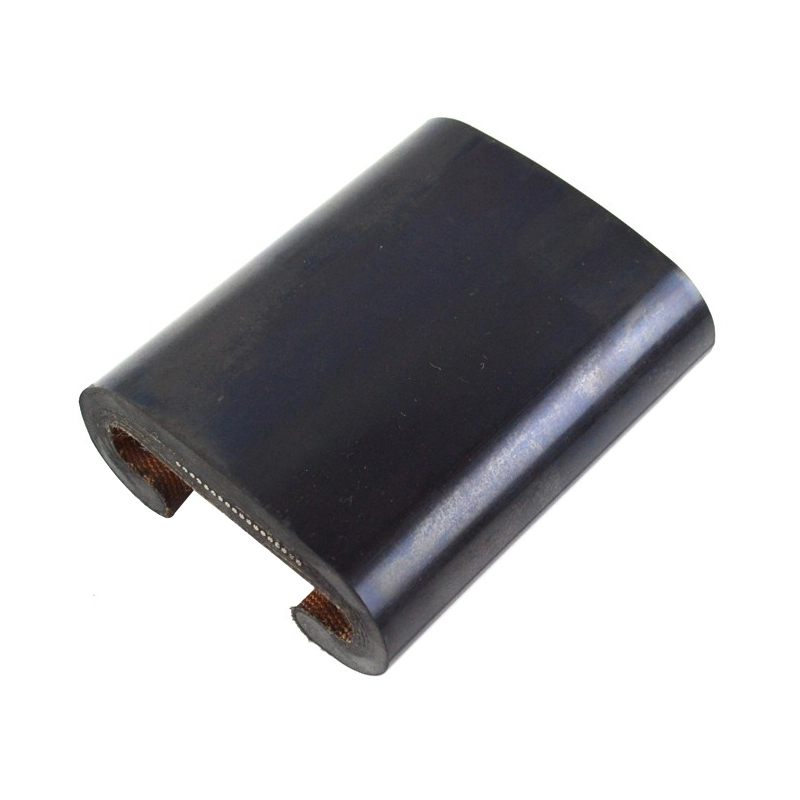
Escalator Parts Escalator Handrail with SDS Walkway Handrail Belt
Fully customizable OEM solutions for SWEOTIS 800 belts. Trusted elevator parts suppliers provide high-durability elevator spare parts for industrial use.
View productA failed drive board stops a lift long before anyone agrees on which part to order, so this page starts at the sticker rather than the catalogue. Read the elevator circuit board string line by line, photograph both faces of the board, and only then line up elevator components against a written quote. The worked example further down uses the 300P CDCL 1QA 590891 590891 board exactly as its own product page lists it.

Most mis-ordered boards come from a photograph that shows the wrong half of the sticker. Five fields settle the identification question, and they take under a minute to collect at the lift.

Photograph both faces. The component side shows connectors, relays and heat-shrink; the solder side shows the terminal layout and any earlier repair work. Four photos — label, front, back, connectors — remove almost every follow-up question before the quote is written.
A board string is rarely one number. It is several fields printed without separators, which is why a single mistyped letter sends the wrong part across the world. Here is how the reference string breaks up on paper.
| Segment | Copy exactly | Why it matters at quote time |
|---|---|---|
| Prefix | 300P | The trailing letter separates this board from a plain 300 series string. Dropping the letter is the most common transcription error. |
| Series letters | CDCL | A four-letter cluster that is easy to confuse with lookalike labels when the photo is blurred or shot at an angle. |
| Revision block | 1QA | Keep the period. Typing a hyphen or a space here changes the string you are quoted against. |
| Numeric body | 590891 | The first copy of the numeric block. The product page lists it once here and once again at the end. |
| Repeated suffix | 590891 | The numeric block genuinely repeats. Both copies belong to the part number, and the model number is shown as 590891 590891. |
How to read this without guessing. The blocks above describe the layout of the string, not what each segment controls. No segment definitions are published on the product page, so treat any explanation of “what 1QA does” as unconfirmed and order on the full string instead.
Below is a complete product record as the supplier publishes it. Treat it as the product format for the board you actually need: same fields, same string, same order of checking.

The listing categorises this item as Elevator Parts with the product type Elevator PCB, and the title identifies it as an elevator inverter printed board. The page carries no voltage, dimension or weight values, so none are claimed here.
| Part No. | 300P CDCL 1QA 590891 590891 |
|---|---|
| Model Number | 590891 590891 |
| Feature | Brand New. Original |
| Type | Elevator Parts |
| Product Name | Elevator PCB |
| MOQ | 1PC |
| Packing | Carton or Wooden Case |
| Payment Terms | T/T, L/C, VISA, Mastercard, E-checking, Paypal |
| Delivery | 1-3 Working Days |
| Warranty Time | One Year |
| Transportation | DHL / TNT / FEDEX / UPS |
The buyer decision hiding in this table. Orders on this site run through a quote list rather than a cart, so the practical question is never “is it in stock” but “is this string the one I am quoting for”. Because MOQ is 1PC and dispatch is 1-3 working days, a single spare board and a small site stock run cost you the same amount of waiting.
Before the part number, confirm what the board is asked to do. This matrix sorts a typical lift cabinet into five board roles so you know which label you are looking for in the first place. It is field guidance, not a compatibility statement.
| Board type | Typical role | Where it usually sits | Label clues | Next step |
|---|---|---|---|---|
| Inverter / drive board | Sits in the drive stage between controller and machine. | Control cabinet, or a drive box near the machine. | Long alphanumeric string, often with a dot segment. | Use the worked example above as the pattern. |
| Main control board | Coordinates car and door commands for the whole unit. | Main cabinet, usually the largest board present. | Board family name plus a firmware or version mark. | Record the version mark before quoting. |
| Door operator board | Drives the car door motor and reads door position. | On the car door operator, or in the door drive box. | Short part number, sometimes with a suffix letter. | Photograph the motor plate alongside it. |
| Car command board (COP) | Collects button presses from the car panel. | Behind the car operating panel. | Small board, connector rows along one edge. | Count the button rows before quoting. |
| Display / indicator board | Drives the floor indicator and announcement output. | Behind the car display or at the landing indicator. | Display type code rather than a long string. | Note the number of floors shown. |
Six items travel with every good request. Send them together and the reply usually arrives as a price instead of a question.

Callouts rarely name the board. This table turns what the technician sees on site into the field that actually gets compared inside a quote — so the decision is made on the part number, not on a description over the phone.
| What you see on site | Record this | Spec field it maps to | Buyer decision |
|---|---|---|---|
| Controller shows a drive fault code | The code text, plus the inverter board label | Part No. and Model Number | Quote the drive board as a single piece, or review a full controller package. |
| Car stops and the doors reopen mid-travel | Door operator board label and motor plate | Part No. | Decide between a board-level fix and a door system item. |
| Buttons respond but floors do not display | Display board label and floor count | Part No. | Source the display board alone instead of a full car panel. |
| A lookalike board arrives and does not suit | The revision or version mark on both units | Revision block | Re-check characters before the second quote, not after shipping. |
| Mixed fleet, label unreadable | Front and back photos plus cabinet photo | Part No. and quantity | Send the photos first and let identification run before pricing. |
Every order on this site runs through a quote list rather than a shopping cart, so a request is the first step of the purchase, not a sales detour.
Email the label close-up, both board faces and the connector detail, with the full part number typed out as well as photographed.
The reply comes back as a quote: part number as checked, quantity, packing as carton or wooden case, payment terms and delivery date.
Dispatch in 1-3 working days by DHL, TNT, FEDEX or UPS, with a one-year warranty on the board and MOQ held at 1PC.
Send the part number string, the photos and the quantity. Direct contact is available by phone on +86 18192988415 or by email at website@hqlifts.com.
Keep adjacent product options together for a faster catalog comparison.
Fully customizable OEM solutions for SWEOTIS 800 belts. Trusted elevator parts suppliers provide high-durability elevator spare parts for industrial use.
View product
Monarch 3000 System Elevator Controller enables seamless modernization for OTIS and Mitsubishi. Trusted by elevator parts suppliers and elevator spare parts manufacturers for reliable elevator…
View product
Elevator PartsPart No: AAA7I7AM2 AAA717AJ2 AAA717AP2 AAA717X1 AAA717X AAA717AD1 AAA7I7WI AAA717AP35-Year Warranty Tensilestrength50KN
View productreview the product details, images, and specifications presented on the official product page.
use the application and use-case information published on the official product page.
confirm the specifications and options listed for the exact product variant before placing an order.
check the official product page or ask the supplier about options shown for the selected product.
use the official contact or inquiry path provided on the site.
include the product page, intended use, required quantity, and any specifications you need the supplier to review.
